![crown-sterling-line-white.png]](https://help.crownsterling.io/hs-fs/hubfs/crown-sterling-line-white.png?height=50&name=crown-sterling-line-white.png)
- Go to your Settings
- Click your profile icon at the bottom right - mobile
- Click the settings gear icon on the bottom left - desktop
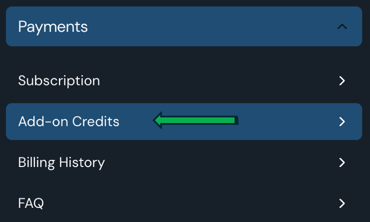
- Under Payments, choose Add-on Credits
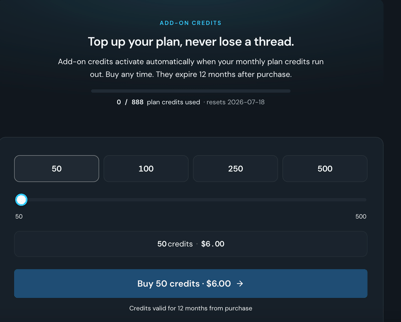
- Choose the amount of credits you would like to purchase
- The minimum is 50 credits for $6
- The minimum is 50 credits for $6
- Select Buy 50 credits

- You will be redirected to the payment page where you enter in your credit/debit card number and billing details
- Please note that credit/debit card is the only payment option at this time
- Please note that credit/debit card is the only payment option at this time
Add-on credits expire after 12 months and are only available to use/purchase with an active subscription