![crown-sterling-line-white.png]](https://help.crownsterling.io/hs-fs/hubfs/crown-sterling-line-white.png?height=50&name=crown-sterling-line-white.png)
- Can I purchase the ORION Architect token?
- ORION Architect is a Solana-based utility token that has not yet entered public circulation. At this stage, participation is limited to eligible legacy token holders through the Legacy Bridge. Details regarding future availability and other news will continue to be communicated separately through official ORION channels.
- Can I change my username?
- We haven't introduced this feature quite yet, but it will be available in the future.
- How do I reset my password?
- You can change your password by going into your settings under security. See our help article for this here.
- What happens if I forget my login info?
- If you forget your password, you will need your recovery key to retrieve it. Our help page for that is here. Please keep in mind, a lost recovery key means a lost account. You can create a new account if you are unable to recover your original one with a different email address.
*Please note, you won't be able to use the same username when creating a new account*
- If you forget your password, you will need your recovery key to retrieve it. Our help page for that is here. Please keep in mind, a lost recovery key means a lost account. You can create a new account if you are unable to recover your original one with a different email address.
- Can I change the email associated with my account?
- Not at this time. We don't send out emails so you aren't missing out on anything by not changing it.
- Can I delete my account?
- Yes! We will be sad to see you go, but you can learn how to delete your account here.
- Is there a time limit on how long I can I can edit the message?
- No, there is no limit.
- Can I see who reacted to my message/comment?
- Yes. Click on the reactions and you will be able to see who reacted to that message.
- How many characters can my group chat name be?
- A group chat name can be 3-40 characters long.
- How to find links, files, and photos posted in a chat without scrolling all the way back?
- Click on the chat name while inside the chat.

- You'll see options for: Members, Media, Files, and Links. Choose what you are looking for and start scrolling.

- Click on the chat name while inside the chat.
- Is there a character limit on messages?
- The limit is 4,000 bytes per message. Things like emojis take up more bytes than letters.
- Is there a size limit for uploading videos?
- Yes, the current limit is 100MB.
- Is there a version of ORION in Spanish?
- Yes! We currently support English and Spanish. This can be changed in your settings.
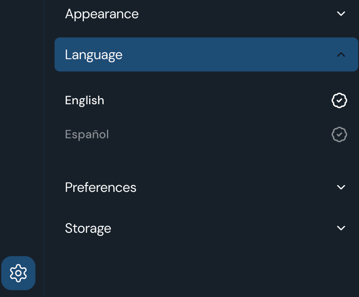
- Yes! We currently support English and Spanish. This can be changed in your settings.
- My app seems to not be working correctly - could it be a bug?
- A few troubleshooting tricks:
- Use the reload tool to refresh your app - located in the menu which can be found by clicking your profile picture at the bottom of the app.
- Log out and back in. Make sure you know your login info before doing this so you don't get locked out.
- Uninstall the app, clear your browsing history, and reinstall the app.
- Do a hard refresh on your desktop 'shift+cmd+r' (Mac) or 'shift+alt+r' (PC).
- Clear your browsing data/cache.
- Clear the site data in the privacy settings of your browser.
- Check what operating system your device is on, it may need to be updated. ORION is optimized for the most recent software versions.
- We recommend using Chrome & Safari for the best user experience. Give a different browser a try if you're able to and not already using one of these.
- If you're still having trouble, send orionsupport a direct message on ORION with details and screenshots of your issue. If you are having login issues, email us at orionmessenger@crownsterling.io
- A few troubleshooting tricks:
- Can I login on multiple devices?
- Yes! You can login on your mobile and desktop devices at the same time. Click here to be directed to the login page.